AgentLabs
AI-Powered Bulk Calling Solution
Automate your voice calling campaigns with AI-powered conversations
🚀 Step by Step Setup Guide
📋 Step 1: System Requirements
💻 Server Requirements
- • OS: Ubuntu 20.04+ / Windows Server 2019+ / macOS 10.15+
- • Node.js: Version 18 or higher
- • PostgreSQL: Version 14 or higher
- • RAM: 2GB minimum (4GB recommended)
- • Storage: 10GB minimum available space
- • CPU: 2 cores minimum
- • SSL Certificate: Required for webhooks
⚡ Step 2: Install Dependencies
For Ubuntu/Debian:
# Update system packages
        sudo apt update && sudo apt upgrade -y

        # Install Node.js 18
        curl -fsSL https://deb.nodesource.com/setup_20.x | sudo -E bash -
        sudo apt install -y nodejs

        # Verify Node.js installation
        node --version
        npm --version

        # Install PostgreSQL
        sudo apt install -y postgresql postgresql-contrib

        # Install PM2 (Process Manager)
        sudo npm install -g pm2

        # Install Nginx (for reverse proxy)
        sudo apt install -y nginx

        # Install certbot for SSL
        sudo apt install -y certbot python3-certbot-nginx
🗃️ Step 3: Database Setup
# Switch to postgres user
        sudo -u postgres psql

        # Create database and user
        CREATE DATABASE agentlabs;
        CREATE USER agentlabs_user WITH PASSWORD 'your_secure_password';
        GRANT ALL PRIVILEGES ON DATABASE agentlabs TO agentlabs_user;

        # Exit PostgreSQL
        \q

        # Test database connection
        psql -h localhost -U agentlabs_user -d agentlabs
⚠️ Important: Replace 'your_secure_password' with a strong password and save it safely !
📦 Step 4: Application Installation
# Navigate to your web directory
        cd /var/www/

        # Extract agentlabs package (replace with your actual package)
        sudo unzip agentlabs.zip
        sudo mv agentlabs-main agentlabs
        sudo chown -R $USER:$USER agentlabs
        cd agentlabs

        # Install dependencies
        npm install

        # Set proper permissions
        sudo chown -R $USER:$USER node_modules
        chmod -R 755 .
⚙️ Step 5: Environment Configuration
# Copy environment template
        cp .env.example .env

        # Edit environment file
        nano .env
Configure .env file:
# Server Configuration
        # =========================================
        # AgentLabs - Environment Variables Template
        # =========================================
        # Copy this file to .env and fill in your actual values
        # NEVER commit .env to version control!

        # =========================================
        # Database Configuration
        # =========================================
        PGHOST=postgres
        PGPORT=5432
        PGUSER=agentlabs
        PGPASSWORD=your_secure_database_password_here
        PGDATABASE=agentlabs
        DATABASE_URL=postgresql://postgres:password@localhost:5432/database_name


        # =========================================
        # Application Configuration
        # =========================================
        NODE_ENV=production
        PORT=5000
        APP_PORT=5000
        APP_URL=https://yourdomain.com

        # Session secret (generate with: openssl rand -base64 32)
        SESSION_SECRET=your_session_secret_here_minimum_32_characters

        # SMTP Configuration
        SMTP_HOST=smtp.your-email-provider.com
        SMTP_PORT=587
        SMTP_USER=your_email_username
        SMTP_PASSWORD=your_email_password
        SMTP_EMAIL_FROM=your_email
        SMTP_FROM_NAME=your_from_name

        # =========================================
        # Twilio Configuration
        # =========================================
        # Get these from: https://console.twilio.com
        TWILIO_ACCOUNT_SID=***********************
        TWILIO_AUTH_TOKEN=************************

        # =========================================
        # ElevenLabs Configuration
        # =========================================
        # Get from: https://elevenlabs.io/app/settings/api-keys
        # Note: You can add multiple keys via the admin panel after installation
        ELEVENLABS_API_KEY=**************************************************

        # =========================================
        # Stripe Configuration (Production)
        # =========================================
        # Get from: https://dashboard.stripe.com/apikeys
        STRIPE_SECRET_KEY=sk_test_*******************************
        VITE_STRIPE_PUBLIC_KEY=pk_test_***************************************

        # =========================================
        # Stripe Configuration (Testing - Optional)
        # =========================================
        # For testing in production environment
        TESTING_STRIPE_SECRET_KEY=sk_test_xxxxxxxxxxxxxxxxxxxxxxxxxxxxx
        TESTING_VITE_STRIPE_PUBLIC_KEY=pk_test_xxxxxxxxxxxxxxxxxxxxxxxxxxxxx

        # =========================================
        # Installation Configuration
        # =========================================
        # These are automatically managed by the installer
        # Do not modify manually unless you know what you're doing
        INSTALLER_COMPLETED=false
        INSTALLER_VERSION=1.0.0


        JWT_SECRET=dev-secret-key-change-in-production-123456789
🔒 Step 6: SSL Certificate Setup
# Generate SSL certificate using Certbot
        sudo certbot --nginx -d your-domain.com

        # Configure Nginx for agentlabs
        sudo nano /etc/nginx/sites-available/agentlabs
Nginx Configuration:
server {
            listen 80;
            server_name your-domain.com;
            return 301 https://$server_name$request_uri;
        }

        server {
            listen 443 ssl;
            server_name your-domain.com;

            ssl_certificate /etc/letsencrypt/live/your-domain.com/fullchain.pem;
            ssl_certificate_key /etc/letsencrypt/live/your-domain.com/privkey.pem;

            location / {
                proxy_pass http://localhost:5000;
                proxy_http_version 1.1;
                proxy_set_header Upgrade $http_upgrade;
                proxy_set_header Connection 'upgrade';
                proxy_set_header Host $host;
                proxy_set_header X-Real-IP $remote_addr;
                proxy_set_header X-Forwarded-For $proxy_add_x_forwarded_for;
                proxy_set_header X-Forwarded-Proto $scheme;
                proxy_cache_bypass $http_upgrade;
            }
        }
# Enable site and restart Nginx
        sudo ln -s /etc/nginx/sites-available/agentlabs /etc/nginx/sites-enabled/
        sudo nginx -t
        sudo systemctl restart nginx
🔄 Step 7: Database Migration
# Navigate to agentlabs directory
        cd /var/www/agentlabs

        # Run database generate
        npm run db:generate

        # Run database migrations
        npm run db:push

        # Run database seed
        npm run db:seed

        # Verify database tables created
        psql -h localhost -U agentlabs_user -d agentlabs -c "\dt"
✅ Success: You should see all agentlabs tables created successfully !
🚀 Step 8: Build and Start Application
# Build the application
        npm run build

        # Start with PM2 (Production)
        pm2 start ecosystem.config.js

        # Or start directly (Development)
        npm run dev

        # Check PM2 status
        pm2 status
        pm2 logs agentlabs

        # Setup PM2 to start on boot
        pm2 startup
        pm2 save
🎉 Step 9: First Login & Testing
🔐 Default Login Credentials
⚠️ Important: Change password immediately after first login!
✅ Quick Test Checklist
- • Successfully logged into admin panel
- • Dashboard loads without errors
- • Added WhatsApp channel successfully
- • Webhook receiving test messages
- • Can send test message
⚙️ Stripe Webhook Setup
Webhook URL:
https://yourdomain.com/api/stripe/webhook
Events to Listen:
- customer.subscription.deleted
- customer.subscription.updated
- invoice.payment_failed
- invoice.payment_succeeded
Steps:
- Go to Stripe → Developers → Webhooks.
- Click Add Endpoint and paste the URL above.
- Select the 4 events listed.
- Copy the Webhook Signing Secret and add to
.envas:STRIPE_SECRET_KEY=whsec_xxxxxxxxxVITE_STRIPE_PUBLIC_KEY=whsec_xxxxxxxxx - Save and test — ensure it returns 200 OK.
🛠️ Common Issues & Solutions
❌ Application won't start
- • Check if PostgreSQL is running:
sudo systemctl status postgresql - • Verify database connection in .env file
- • Check if port 5000 is available:
lsof -i :5000 - • View application logs:
pm2 logs agentlabs
📋 What is AgentLabs?
AgentLabs is an advanced AI-powered bulk calling solution that combines cutting-edge technologies to automate voice communications at scale. Using Twilio for reliable call delivery, and ElevenLabs for natural-sounding voice synthesis, AgentLabs enables businesses to conduct thousands of automated voice calls with human-like interactions.
🎯 Perfect For
- • Sales teams conducting outbound campaigns
- • Customer service teams handling support calls
- • Marketing teams running promotional campaigns
- • Survey and feedback collection
- • Appointment reminders and confirmations
- • Lead generation and qualification
⚡ Key Technologies
- • Twilio: Enterprise-grade call infrastructure
- • ElevenLabs: Human-like voice synthesis
- • Real-time Processing: Instant response generation
🔐 Two-Panel System
👑 Super Admin Panel
- • Create and manage subscription plans
- • Monitor system-wide performance
- • Configure global settings
- • Manage admin accounts
- • View comprehensive analytics
👨💼 Admin Panel
- • Launch bulk calling campaigns
- • Manage contact lists and CSV uploads
- • Configure AI voice agents
- • Track campaign performance
- • Access call recordings and transcripts
✨ Core Features
Bulk Call Management
Make thousands of simultaneous calls with CSV upload support, contact list management, call scheduling, and automated retry logic for failed calls.
Natural Voice Synthesis
ElevenLabs integration delivers ultra-realistic, human-like voice quality with multiple voice options, accent support, and emotion recognition capabilities.
Multilingual Support
Conduct calls in multiple languages with automatic language detection, translation capabilities, and region-specific voice accents for global reach.
Real-time Analytics
Comprehensive dashboard showing call success rates, conversation duration, sentiment analysis, response accuracy, and ROI tracking in real-time.
Automated Workflows
Design custom conversation flows with conditional logic, dynamic responses, automated call-backs, appointment scheduling, and CRM integration.
Call Recording & Transcripts
Automatic recording of all calls with AI-powered transcription, keyword extraction, sentiment analysis, and searchable conversation history.
Smart Call Routing
Intelligent call distribution based on time zones, agent availability, customer preferences, and automated escalation to human agents when needed.
CRM Integration
Seamless integration with popular CRM platforms for automatic data sync, lead scoring, follow-up scheduling, and customer journey tracking.
🔄 How AgentLabs Works
Upload Contacts
Import your contact list via CSV or connect your CRM
Configure AI Agent
Set conversation goals, voice preferences, and response logic
Launch Campaign
Twilio initiates calls while ElevenLabs handle conversations
Track Results
Monitor performance with real-time analytics and insights
👑 Super Admin Dashboard Features
Complete platform management and monitoring tools for Super Administrators
Analytics
Platform-wide metrics & insights
Users
Admin user management
Contacts
All platform contacts
Plans
Subscription plan management
Credits
Credit allocation & tracking
Phones
Twilio phone number management
Queue
Call queue monitoring
ElevenLabs
Voice model configuration
Notifications
System-wide alerts
Settings
Global platform settings
Analytics Dashboard
Platform-wide performance monitoring and insights
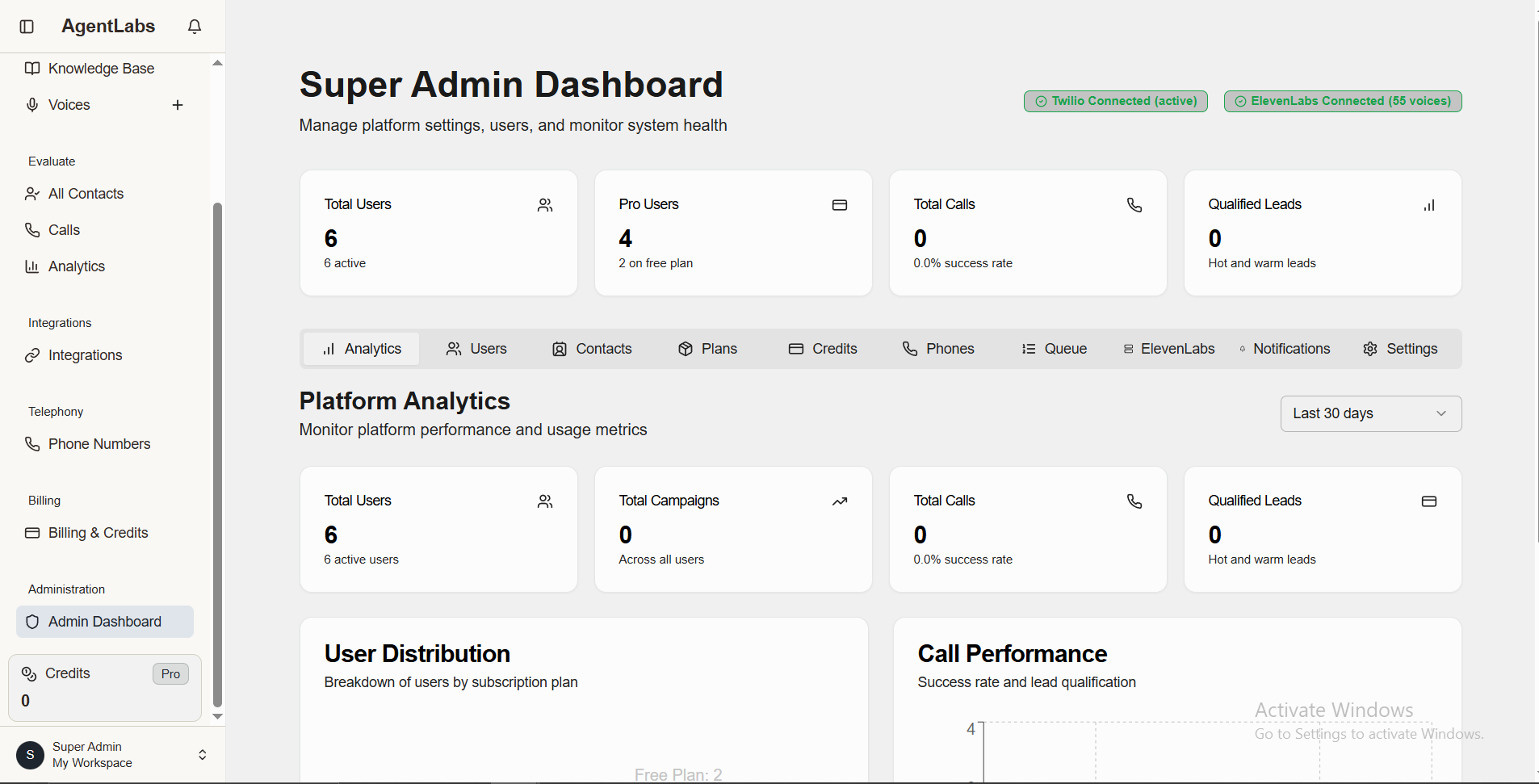
📈 What Analytics Dashboard Shows
Key Metrics Overview
- • Total Users: Number of active admin accounts on the platform
- • Pro Users: Count of paid subscription users
- • Total Calls: Cumulative calls made across all users
- • Qualified Leads: High-quality leads generated from campaigns
- • Success Rate: Overall platform call success percentage
Connection Status
- • Twilio Connection: Real-time telephony API status (Connected/Disconnected)
- • ElevenLabs Connection: Voice synthesis API status with available voice count
- • API Health: System health monitoring and alerts
- • Service Status: All integrated services operational status
User Management
Manage admin user accounts, plans, and permissions
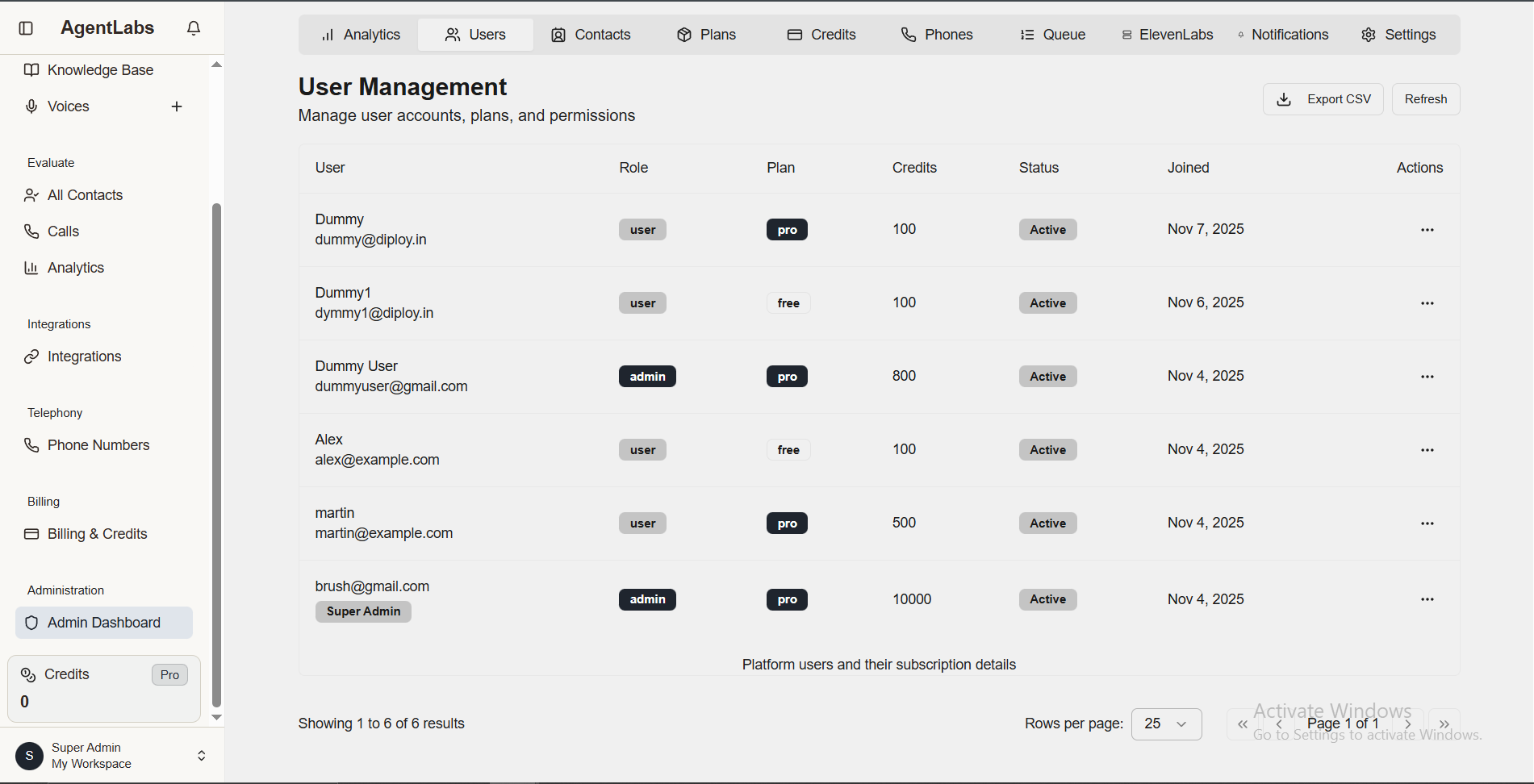
📋 User Management Overview
Table Columns
- • User: Name and email address
- • Role: User/Admin/Super Admin badges
- • Plan: Free or Pro subscription
- • Credits: Available credit balance
- • Status: Active/Inactive account status
- • Joined: Account creation date
Quick Actions
- • Export CSV: Download user list data
- • Refresh: Reload latest user data
- • Actions Menu (...): Edit, manage credits, change plan, suspend user
- • Pagination: Navigate through user pages (25, 50, 100 rows per page)
Plan Management
Configure subscription plans and their limits
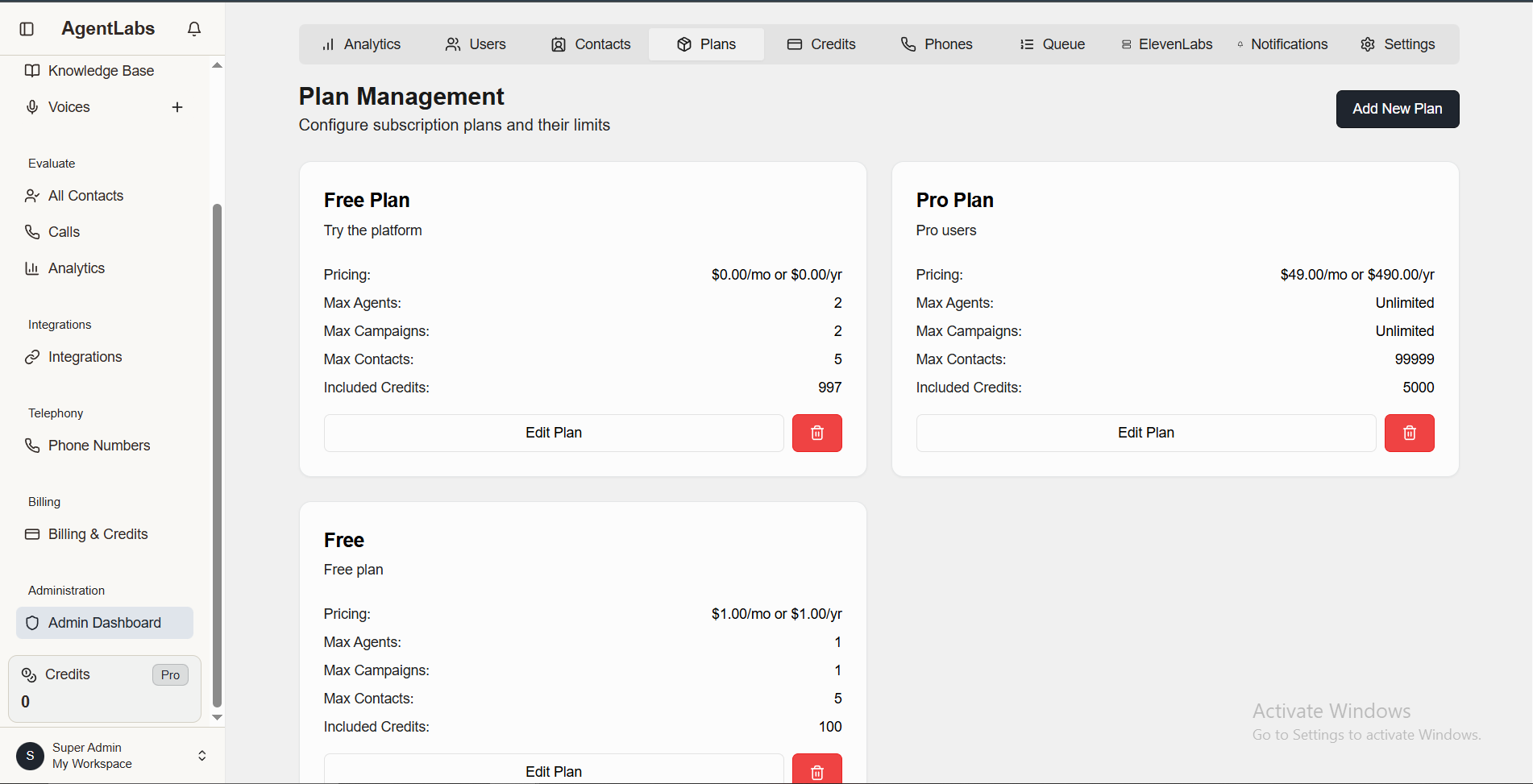
📋 Plan Management Overview
Available Plans
- • Free Plan: $0.00/mo - Max 2 agents, 2 campaigns, 5 contacts, 997 credits
- • Pro Plan: $49.00/mo - Unlimited agents, campaigns, 99999 contacts, 5000 credits
- • Free (Legacy): $1.00/mo - Max 1 agent, 1 campaign, 5 contacts, 100 credits
Quick Actions
- • Add New Plan: Create new subscription tiers from top right button
- • Edit Plan: Modify pricing, limits, features for existing plans
- • Delete Plan: Remove unused plans with red trash icon
Credit Packages
Manage credit packages available for purchase
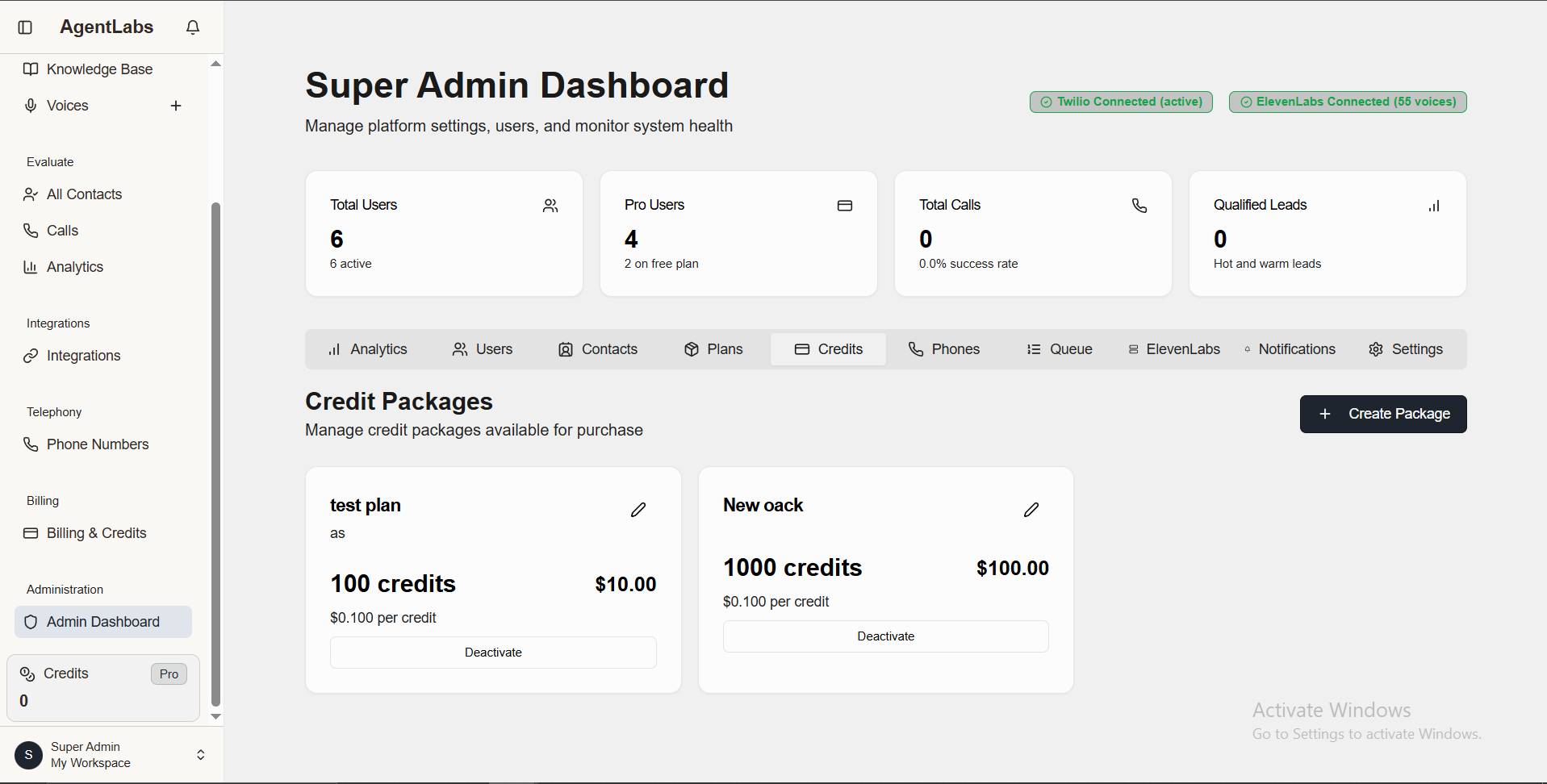
📋 Credit Packages Overview
Available Packages
- • Test Plan: 100 credits for $10.00 ($0.100 per credit)
- • New Pack: 1000 credits for $100.00 ($0.100 per credit)
Quick Actions
- • Create Package: Add new credit packages from top right button
- • Edit Package: Modify credits amount and pricing with pencil icon
- • Deactivate: Disable package from being purchased
Phone Number Management
Manage system pool and user phone numbers
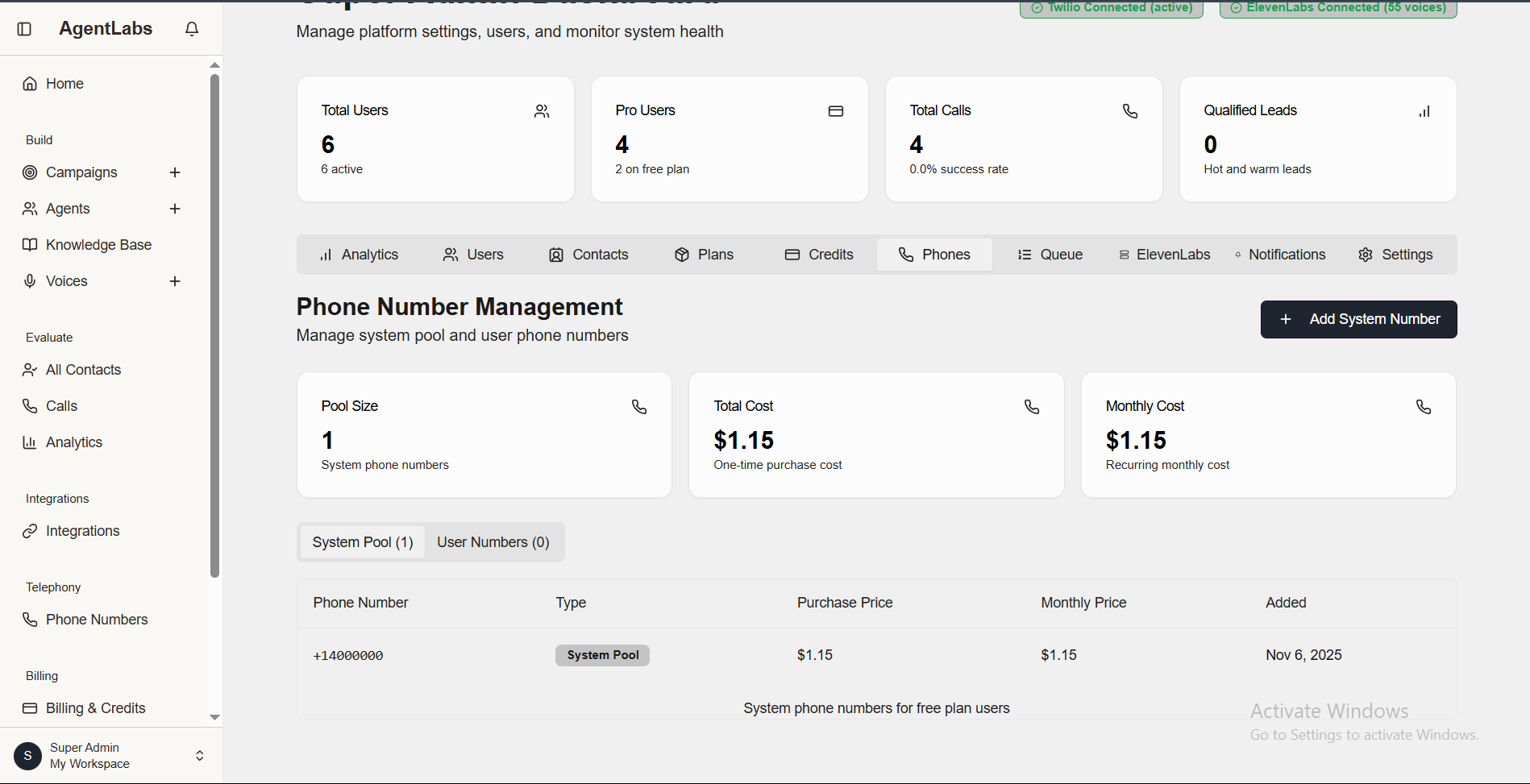
📋 Phone Number Management Overview
Key Metrics
- • Pool Size: 1 system phone number available
- • Total Cost: $1.15 one-time purchase cost
- • Monthly Cost: $1.15 recurring monthly cost
Quick Actions
- • Add System Number: Add new phone numbers to system pool
- • View Details: Check phone number type, pricing, and dates
- • System Pool Tab: View system pool numbers (1 active)
Call Queue Management
Real-time view of queued and processing calls
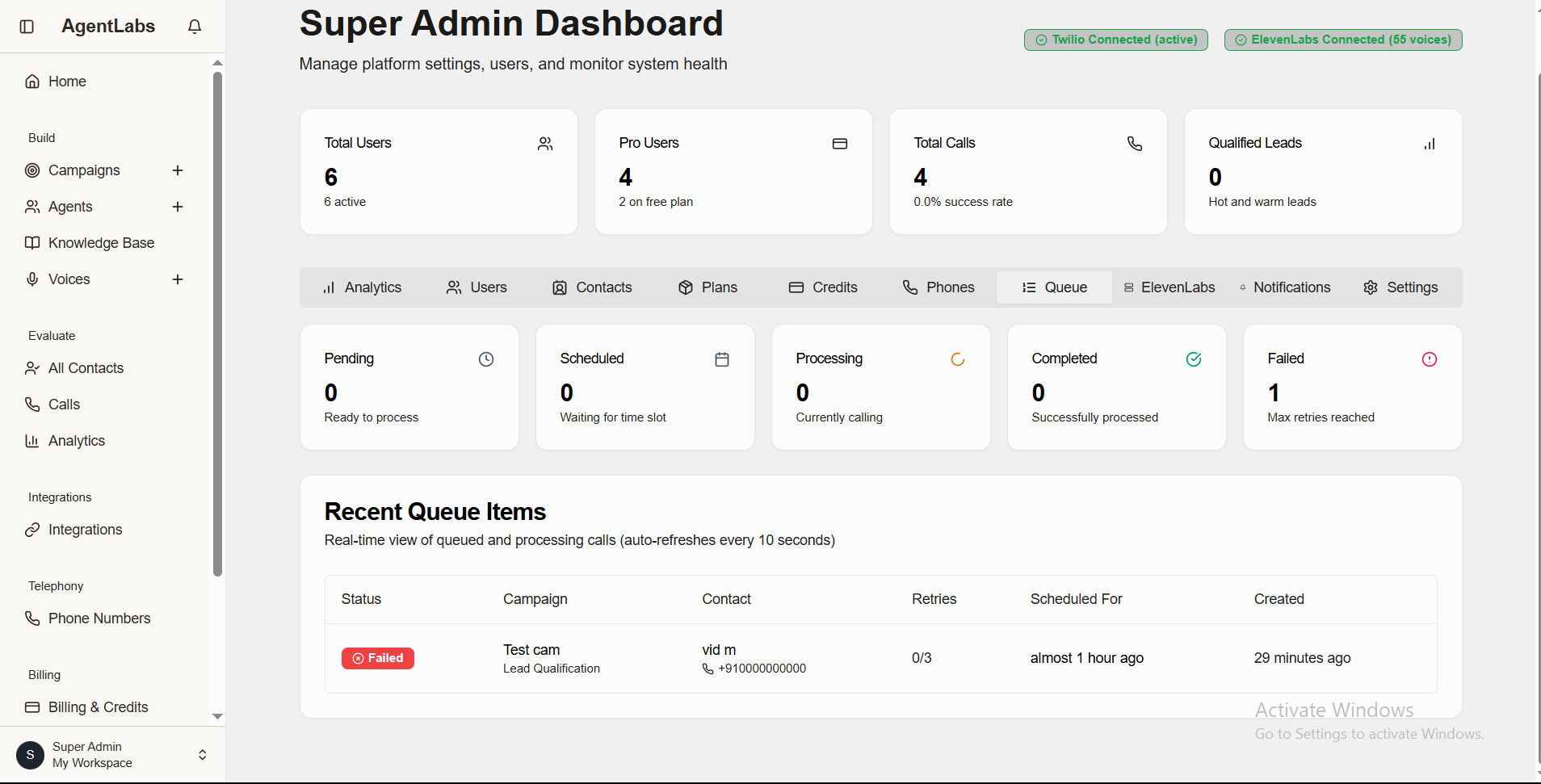
📋 Queue Status Overview
Queue Statuses
- • Pending: 0 calls ready to process
- • Scheduled: 0 calls waiting for time slot
- • Processing: 0 calls currently calling
- • Completed: 0 calls successfully processed
- • Failed: 1 call max retries reached
Queue Details Table
- • Status: Failed/Pending/Scheduled/Processing/Completed badges
- • Campaign: Campaign name (Test cam - Lead Qualification)
- • Contact: Phone number of contact (vid m +910000000000)
- • Retries: Attempt count (0/3)
- • Scheduled For & Created: Timestamps for tracking
ElevenLabs API Key Pool
Manage multiple ElevenLabs API keys for load balancing and scalability
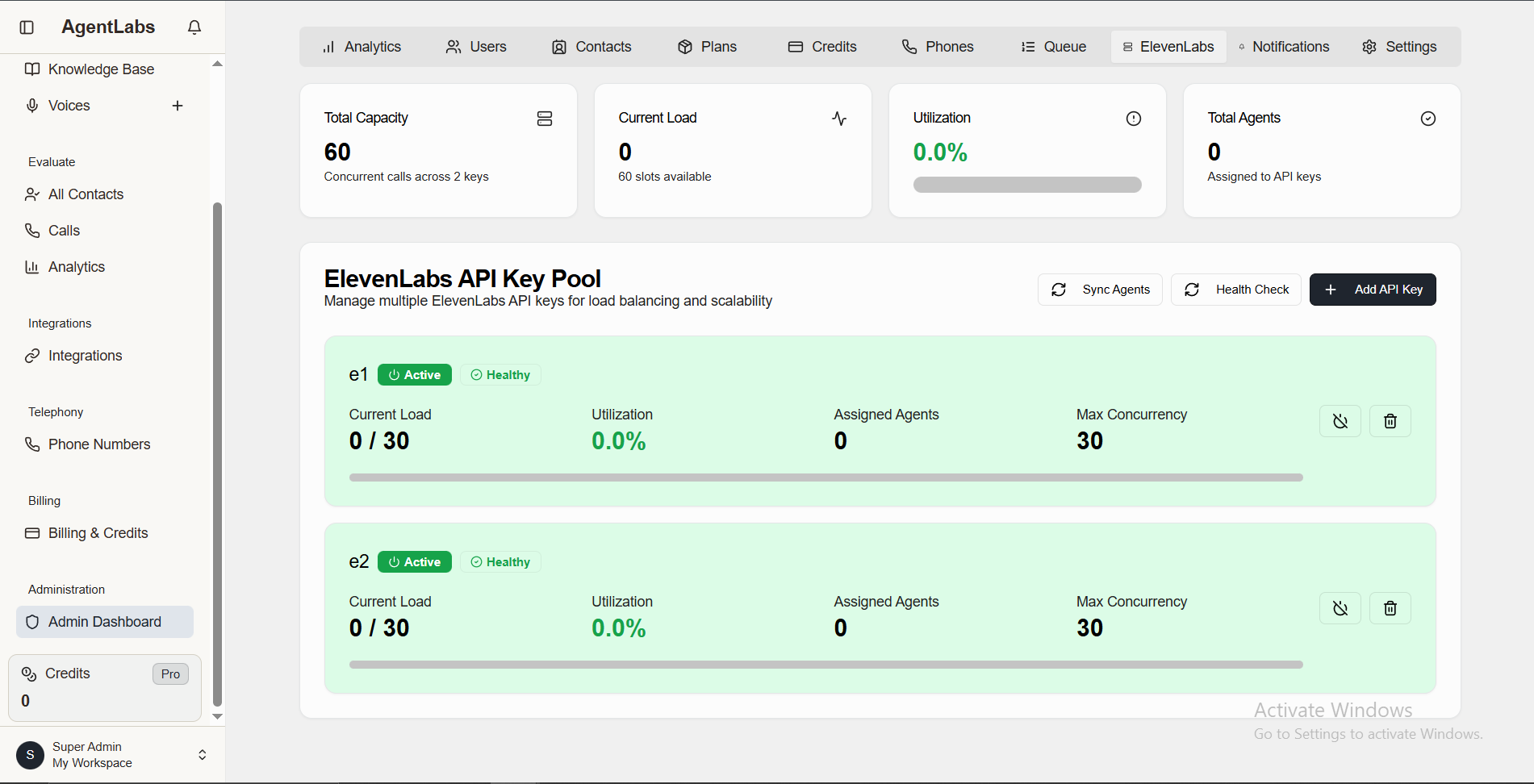
📋 ElevenLabs API Pool Overview
Pool Capacity Metrics
- • Total Capacity: 60 concurrent calls across 2 API keys
- • Current Load: 0 active slots (60 slots available)
- • Utilization: 0.0% current usage
- • Total Agents: 0 API keys assigned
Quick Actions
- • Add API Key: Add new ElevenLabs API key to pool
- • Sync Agents: Synchronize voice agents across pool
- • Health Check: Monitor API key health status
API Key Details
- • e1: Active & Healthy - Load: 0/30 - Utilization: 0.0% - Assigned Agents: 0 - Max Concurrency: 30
- • e2: Active & Healthy - Load: 0/30 - Utilization: 0.0% - Assigned Agents: 0 - Max Concurrency: 30
Broadcast Notifications
Send notifications to all users in the platform
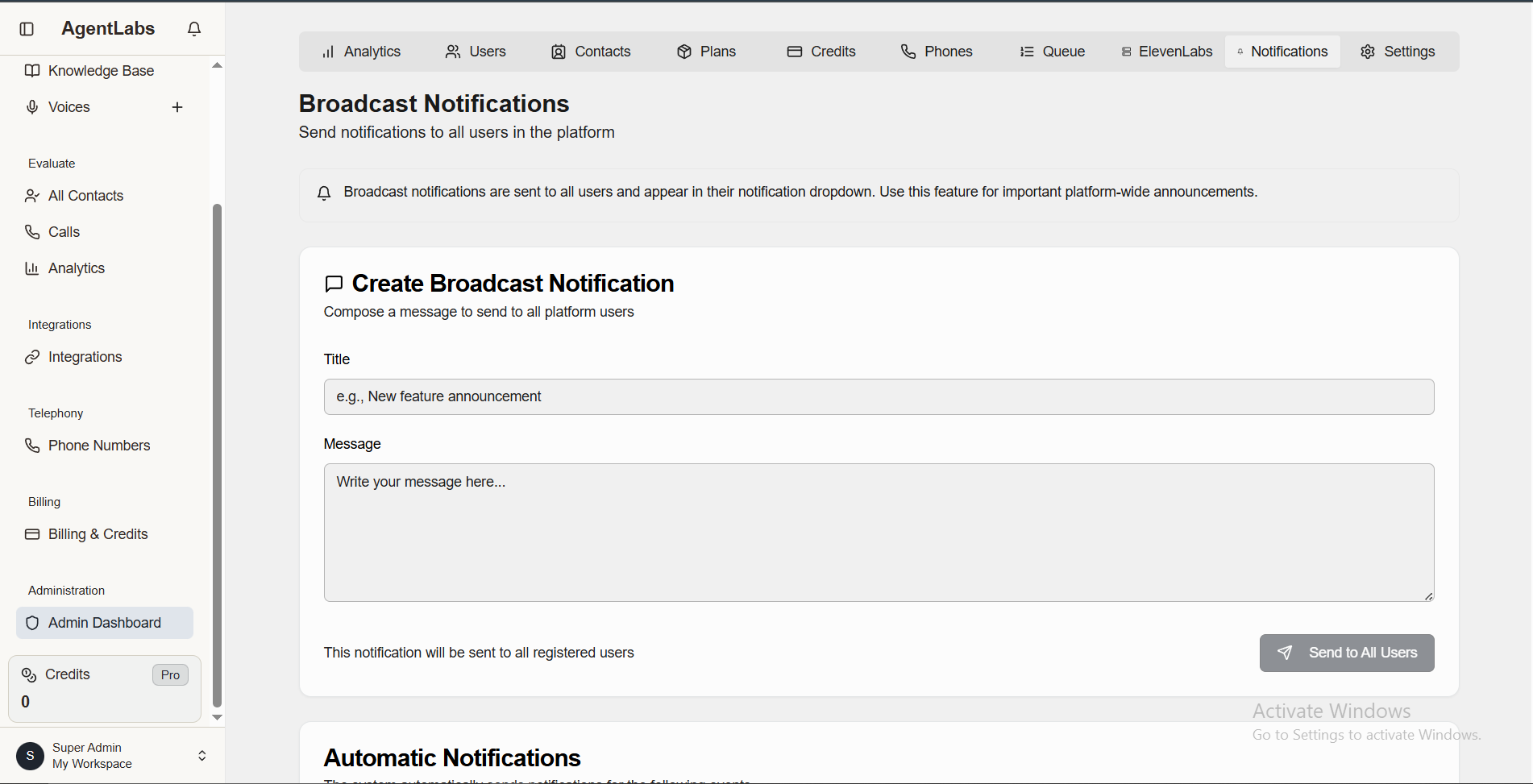
📋 Notifications Overview
Broadcast Features
- • Title Field: Notification subject (e.g., "New feature announcement")
- • Message Field: Rich text message body for detailed announcement
- • Send to All: Button to send notification to all registered users
Notification Details
- • Delivery: Notifications sent to all users in notification dropdown
- • Purpose: Important platform-wide announcements and updates
- • Automatic Notifications: System sends alerts for critical events
Global Settings
Configure platform-wide settings and defaults
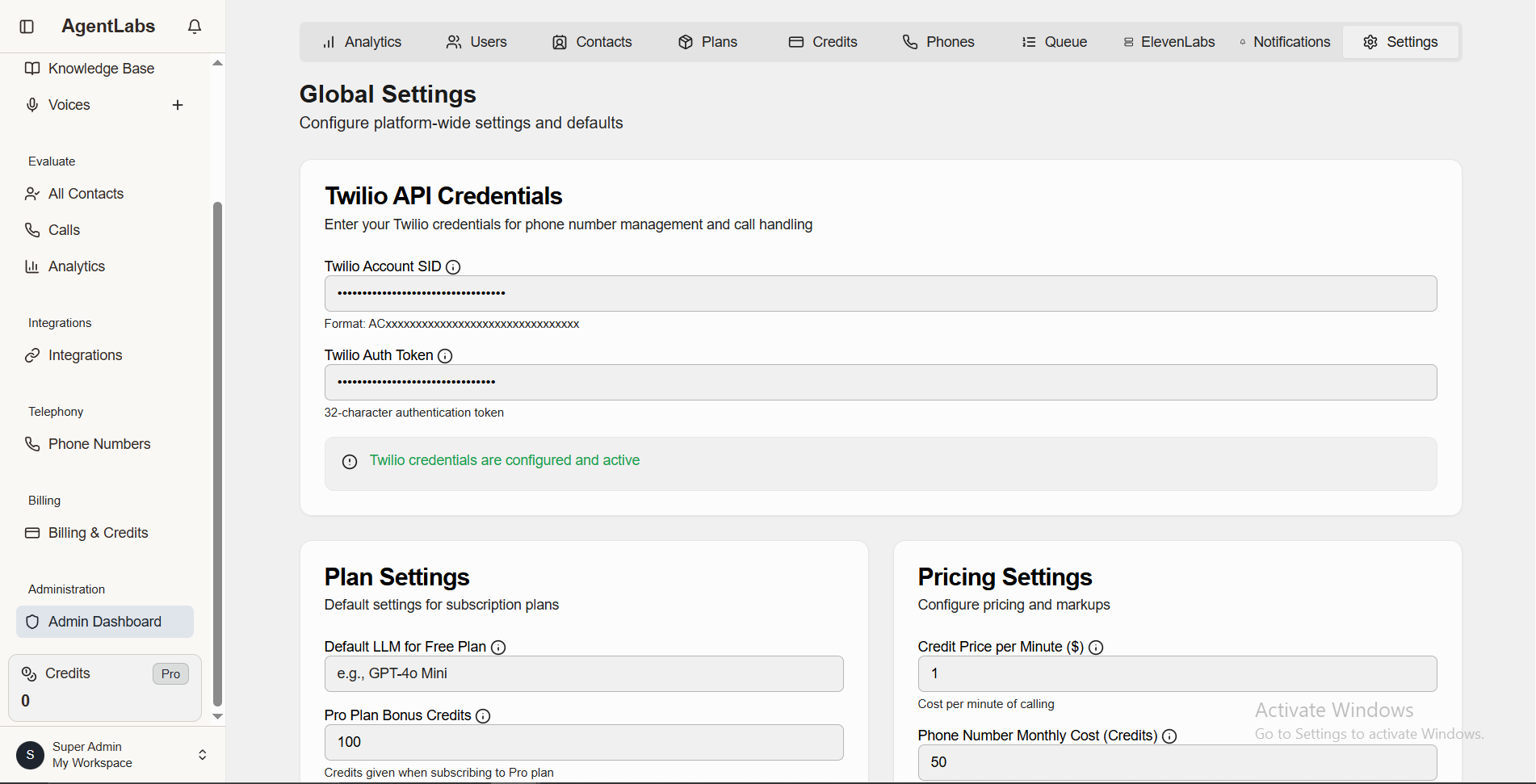
📋 Settings Overview
Twilio API Credentials
- • Account SID: Format ACxxxxxxxxxxxxxxxxxxxxx (masked)
- • Auth Token: 32-character authentication token (masked)
- • Status: Twilio credentials configured and active (green indicator)
Plan & Pricing Settings
- • Default LLM: GPT-4o Mini (AI model for conversations)
- • Pro Plan Bonus: 100 credits included with Pro subscription
- • Credit Price: $1 per minute of calling
- • Phone Cost: 50 credits monthly per phone number
All Contacts
View all unique contacts across all campaigns (duplicates merged by phone number)
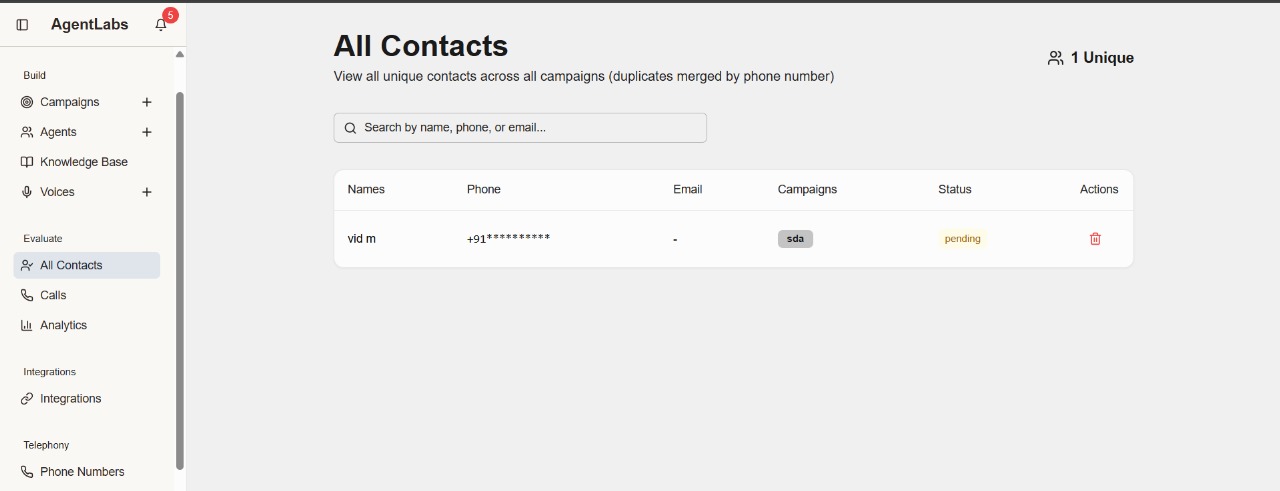
📋 All Contacts Overview
Contact List Features
- • Unique Counter: "1 Unique" contact shown in top right
- • Search Bar: Search by name, phone, or email
- • Duplicate Merging: Auto-merge contacts with same phone number
- • Contact Display: Name: "vid m" with masked phone (+91**********)
Table Columns
- • Names: Contact full name display
- • Phone: Phone number (partially masked for privacy)
- • Email: Email address (shows "-" if not available)
- • Campaigns: Badge showing associated campaign (e.g., "sda")
- • Status: Call status badge (pending, completed, failed)
- • Actions: Delete icon to remove contact
Contact Management Features
- ✓ View all contacts from every campaign in one place
- ✓ Search and filter contacts quickly
- ✓ See which campaigns each contact is part of
- ✓ Track call status for each contact (pending, in-progress, completed)
- ✓ Delete unwanted contacts individually
- ✓ Automatic deduplication by phone number
- ✓ Privacy protection with masked phone numbers
Calls & Conversations
View call records, transcripts, recordings, and AI analysis
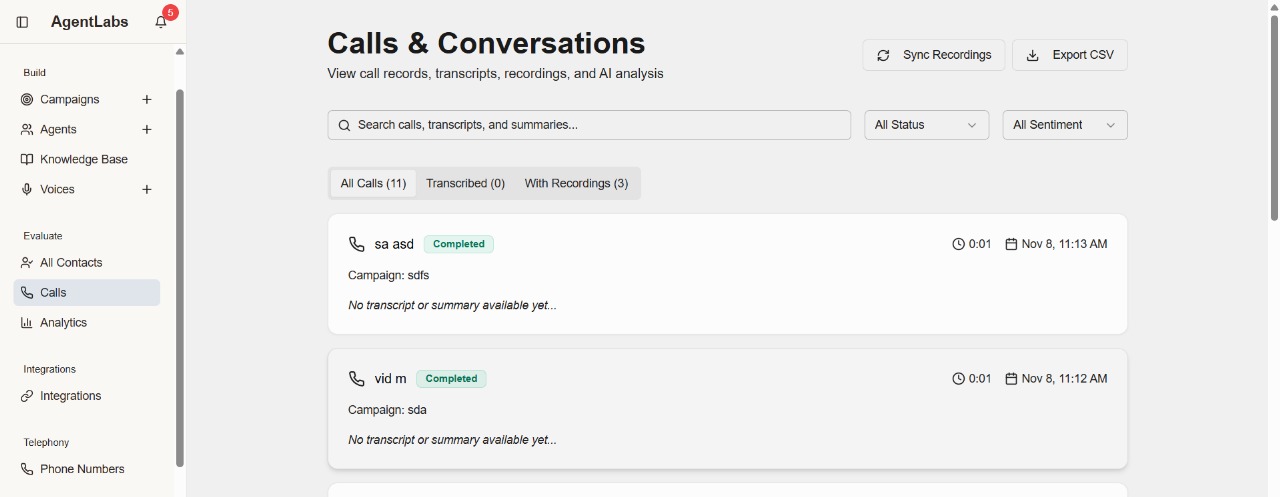
📋 Calls & Conversations Overview
Call List Features
- • Search Bar: Search calls, transcripts, and summaries
- • Filter Options: All Status dropdown and All Sentiment filter
- • Sync Recordings: Button to sync call recordings from Twilio
- • Export CSV: Download all call data in CSV format
Call Tabs
- • All Calls (11): Complete list of all calls made
- • Transcribed (0): Calls with AI-generated transcripts
- • With Recordings (3): Calls with audio recordings available
Call Record Details
Example Call 1: "sa asd"
- • Status: Completed (green badge)
- • Campaign: sdfs
- • Duration: 0:01
- • Timestamp: Nov 8, 11:13 AM
- • Note: "No transcript or summary available yet..."
Example Call 2: "vid m"
- • Status: Completed (green badge)
- • Campaign: sda
- • Duration: 0:01
- • Timestamp: Nov 8, 11:12 AM
- • Note: "No transcript or summary available yet..."
Call Information Displayed
- ✓ Contact name with phone icon
- ✓ Call status badge (Completed, In Progress, Failed)
- ✓ Associated campaign name
- ✓ Call duration (minutes:seconds)
- ✓ Date and time of call
- ✓ Transcript availability status
- ✓ AI summary and sentiment analysis (when available)
- ✓ Recording playback option
Key Features
- ✓ View complete call history across all campaigns
- ✓ Listen to call recordings
- ✓ Read AI-generated transcripts
- ✓ Review conversation summaries
- ✓ Filter by call status and sentiment
- ✓ Export data for reporting and analysis
- ✓ Sync recordings from Twilio automatically
👨💼 Admin Dashboard Features
Complete admin panel tools for managing campaigns, contacts, and calling operations
Home
Dashboard overview
Campaigns
Create & manage campaigns
Agents
AI voice configuration
Knowledge Base
Training data management
Voices
Voice selection & settings
All Contacts
Contact management
Calls
Call history & logs
Analytics
Performance reports
Integrations
Third-party integrations
Phone Numbers
Phone management
Billing & Credits
Credit balance & payments
Home Dashboard
Overview of your calling campaigns and performance
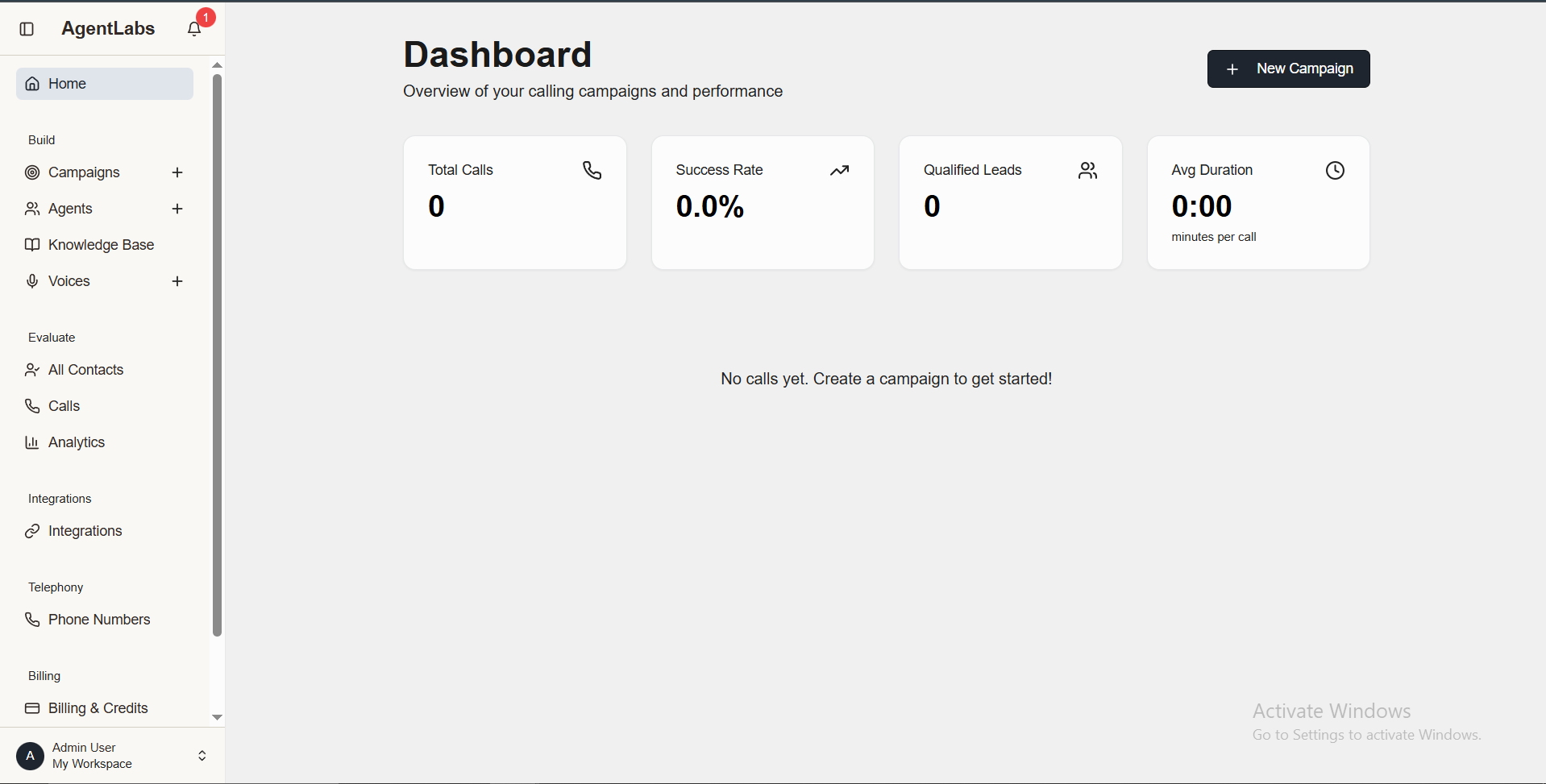
📊 Dashboard Overview
Key Metrics
- • Total Calls: 0 calls made (start with campaigns)
- • Success Rate: 0.0% call completion rate
- • Qualified Leads: 0 high-quality leads generated
- • Avg Duration: 0:00 minutes per call
Quick Actions
- • New Campaign Button: Top right button to create campaigns
- • Empty State: "No calls yet. Create a campaign to get started!"
- • Sidebar Navigation: Quick access to all admin features
Campaigns Management
Manage and monitor all your calling campaigns
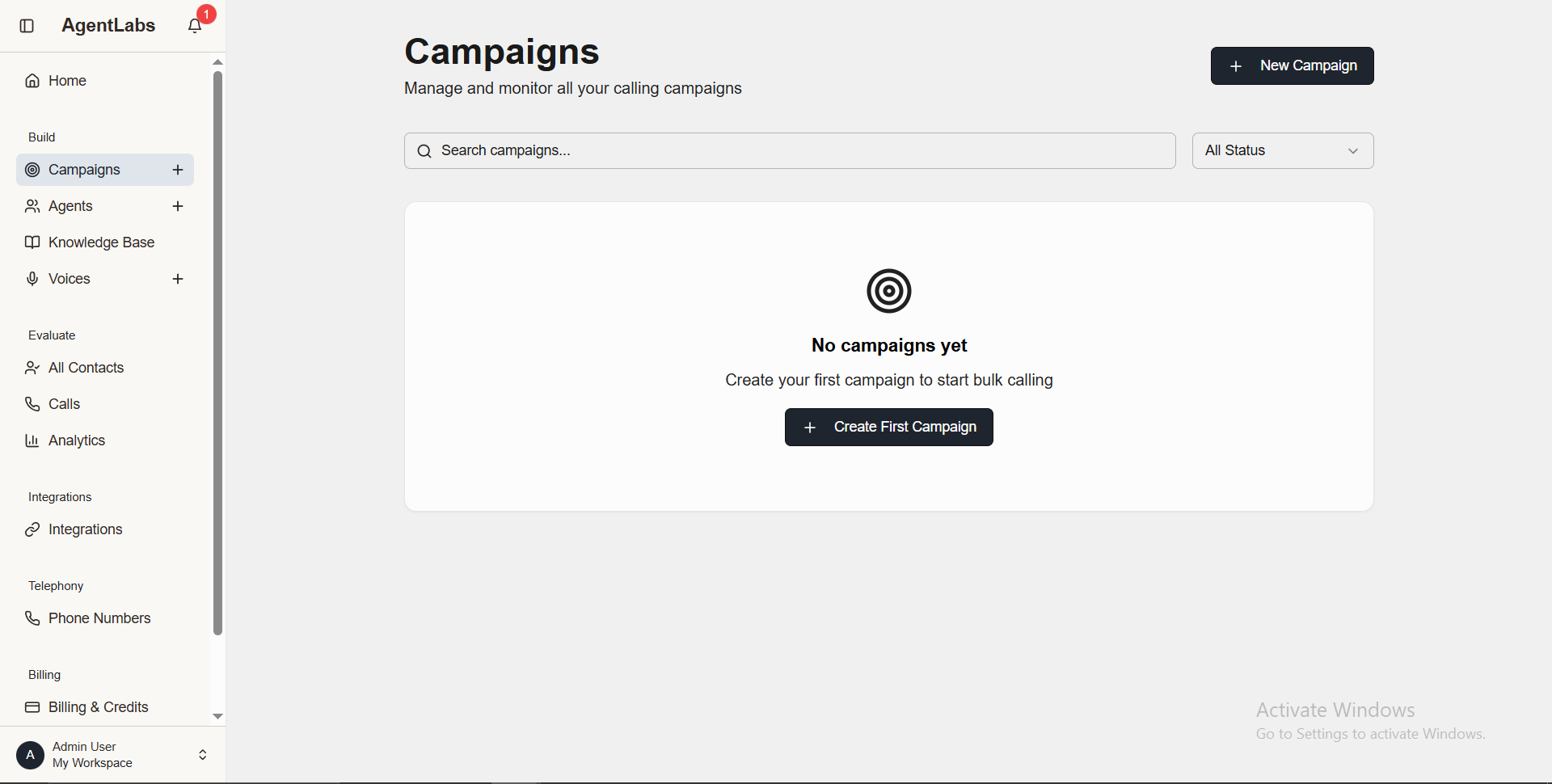
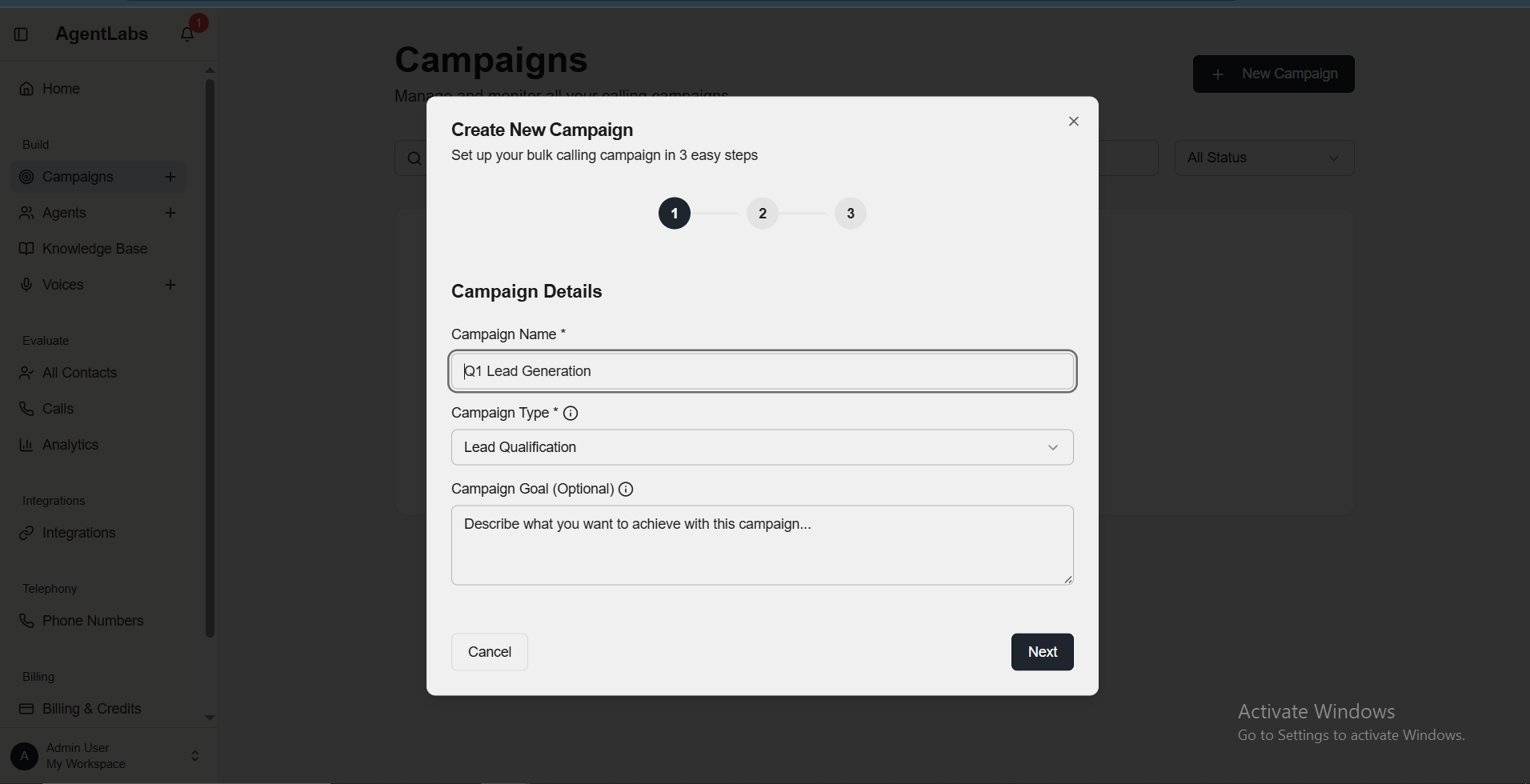
📋 Campaigns Overview
Campaign List Features
- • Search Bar: Search campaigns by name
- • Status Filter: Filter by All Status, Active, Completed, Paused
- • New Campaign Button: Top right to create new campaign
- • Empty State: "No campaigns yet" message with create button
Create Campaign Modal (Step 1/3)
- • Campaign Name: Enter campaign title (e.g., "Q1 Lead Generation")
- • Campaign Type: Select Lead Qualification, Sales, Support, Survey
- • Campaign Goal: Optional description of campaign objectives
- • Step Indicator: Shows Step 1 of 3 progress
AI Agents Management
Create and manage your conversational AI agents
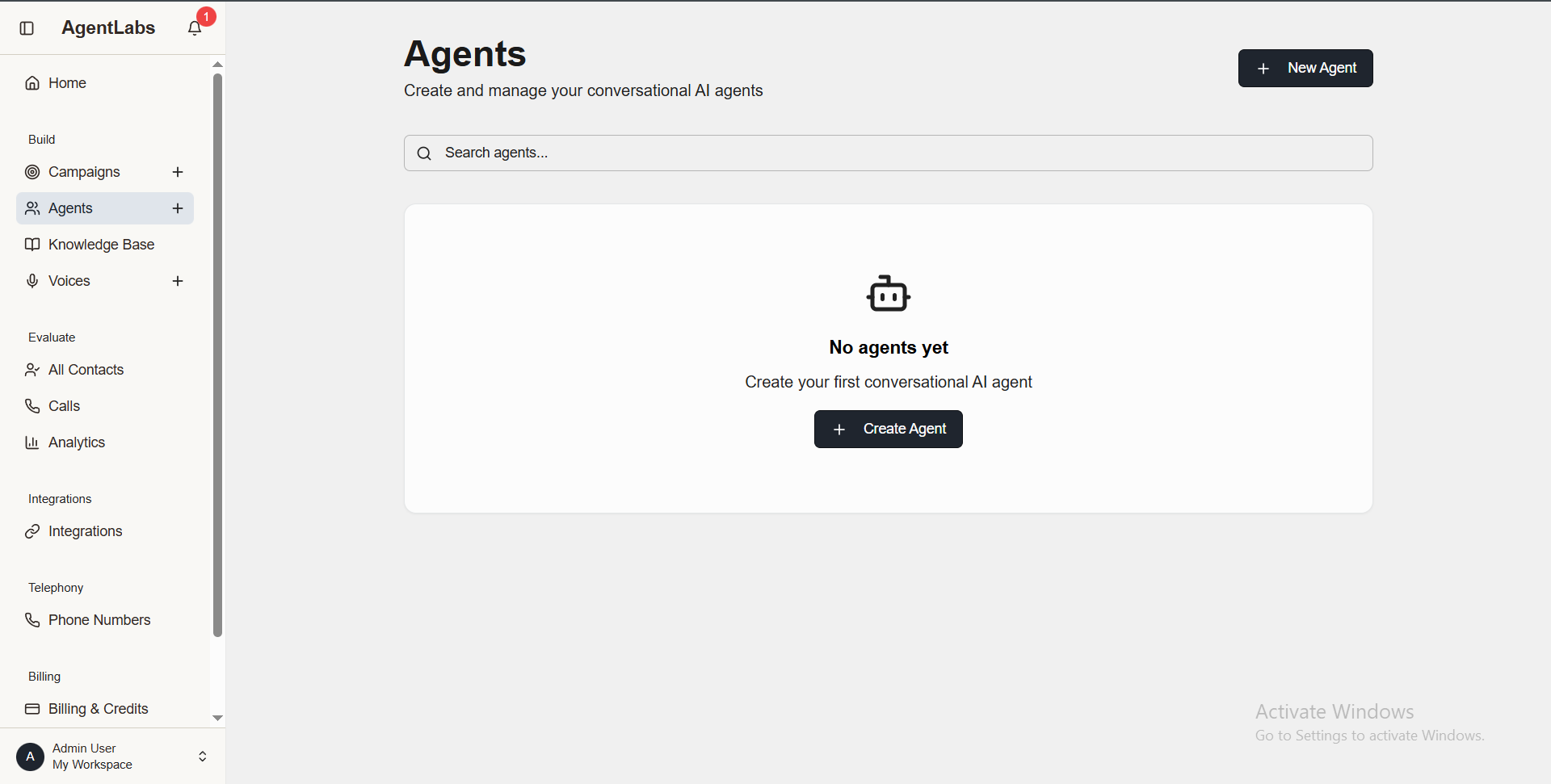
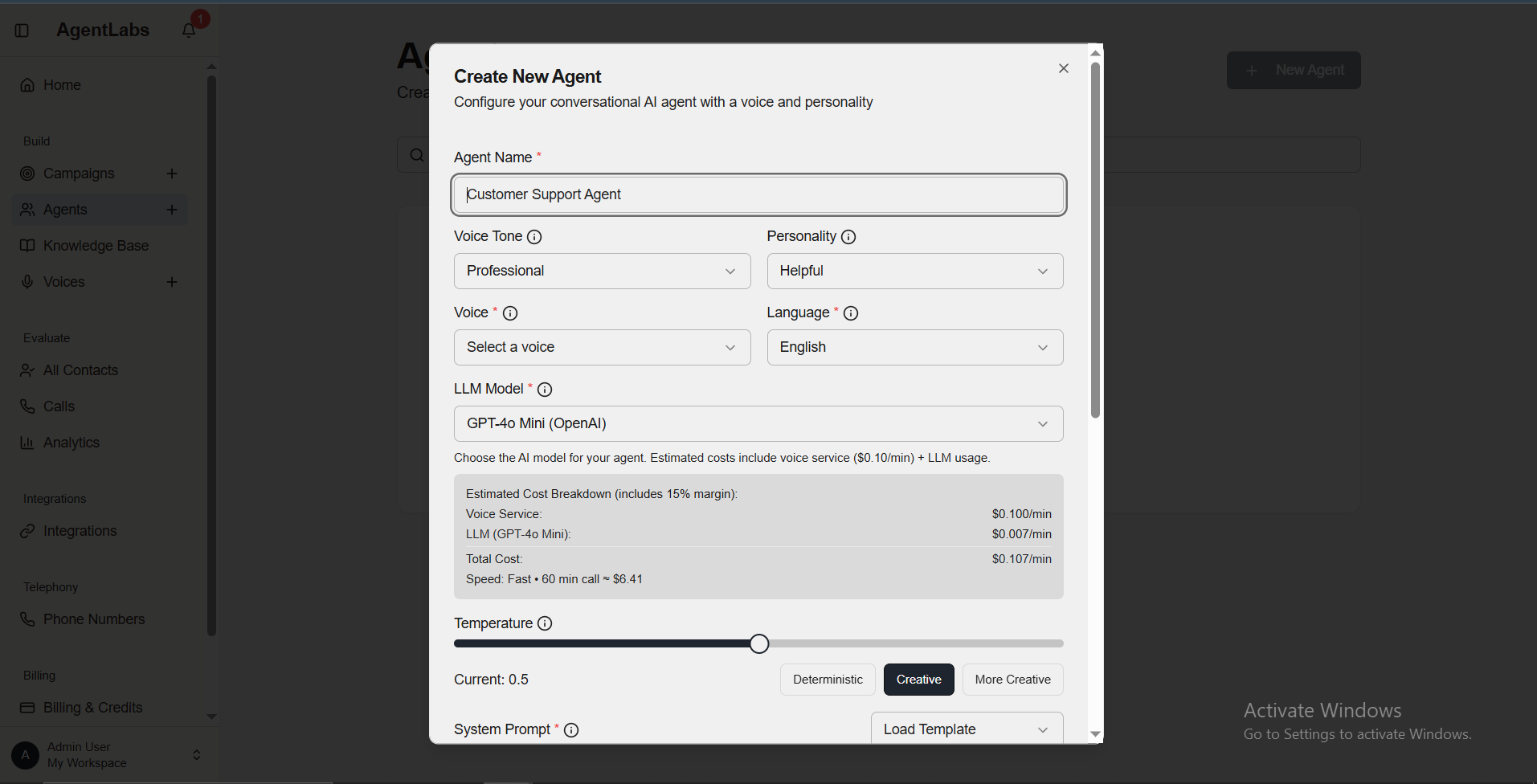
📋 Agents Overview
Agent List Features
- • Search Bar: Search agents by name
- • New Agent Button: Top right to create new AI agent
- • Empty State: "No agents yet" message with create button
- • Agent Icon: Robot icon showing AI agent type
Create Agent Modal
- • Agent Name: Give your agent a name (e.g., "Customer Support Agent")
- • Voice Tone: Select tone (Professional, Friendly, etc.)
- • Personality: Choose personality (Helpful, Assertive, etc.)
- • Voice Selection: Pick from available ElevenLabs voices
- • Language: Select communication language
- • LLM Model: Choose AI model (GPT-4o Mini with cost breakdown)
- • Temperature: Slider to control creativity (Deterministic to Creative)
- • System Prompt: Load pre-built templates or customize behavior
Cost Breakdown
Estimated cost per minute includes:
- • Voice Service: $0.100/min (ElevenLabs)
- • LLM (GPT-4o Mini): $0.007/min
- • Total Cost: $0.107/min (~$6.41 for 60 min call)
Knowledge Base Management
Upload training data and documents for your AI agents
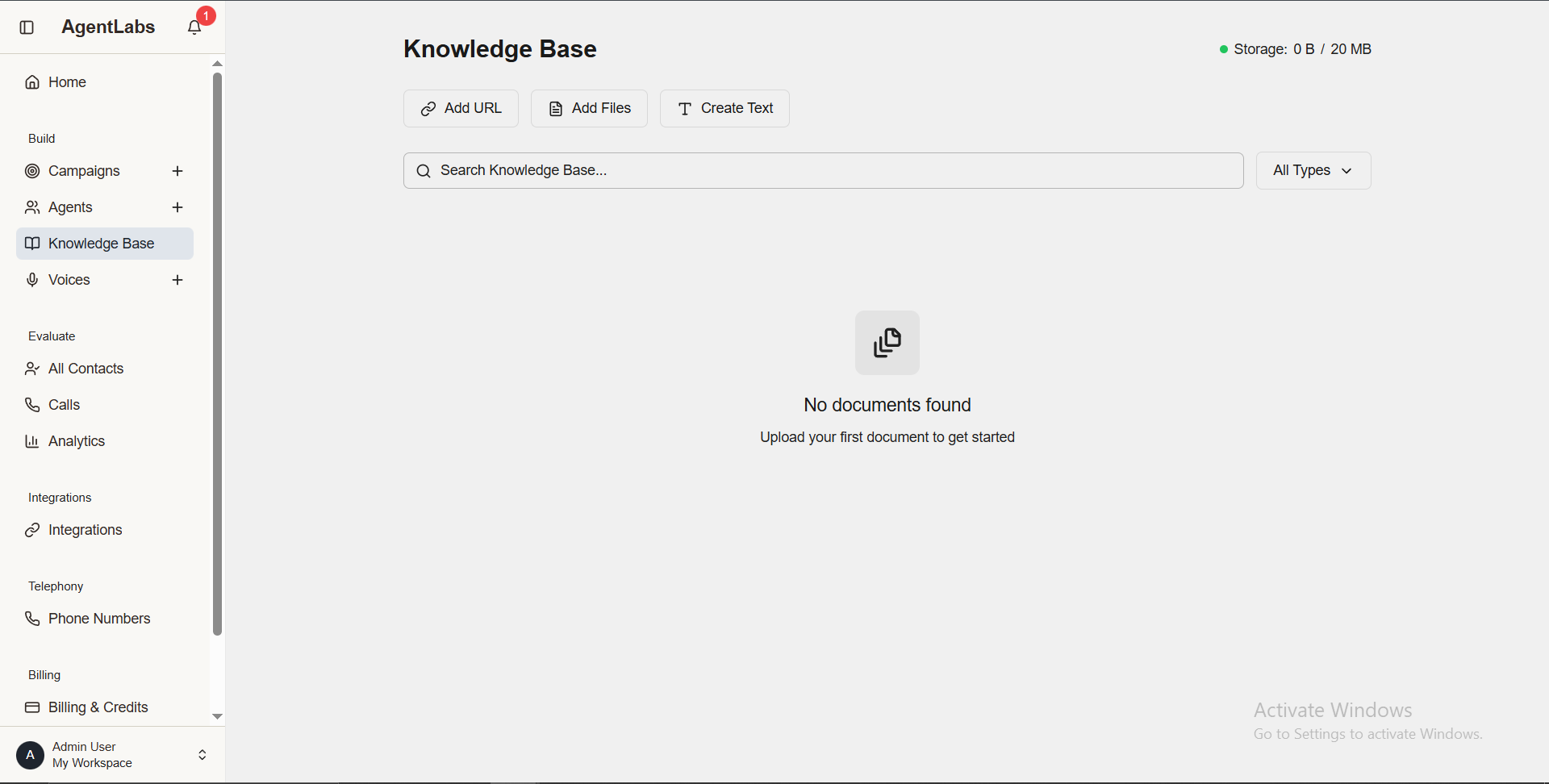
📋 Knowledge Base Overview
Upload Options
- • Add URL: Link to external resources or web pages
- • Add Files: Upload PDF, DOC, TXT documents
- • Create Text: Write knowledge directly in editor
Storage & Features
- • Storage Info: 0 B / 20 MB available
- • Search: Quick search across knowledge base
- • Filter: Filter by document type (All Types)
- • Empty State: "No documents found" message
Purpose
Upload your first document to get started. Your knowledge base helps AI agents understand context and provide accurate responses during calls. This training data is used to enhance agent performance and ensure better customer interactions.
Voices Library
Browse and preview ElevenLabs voices for your agents
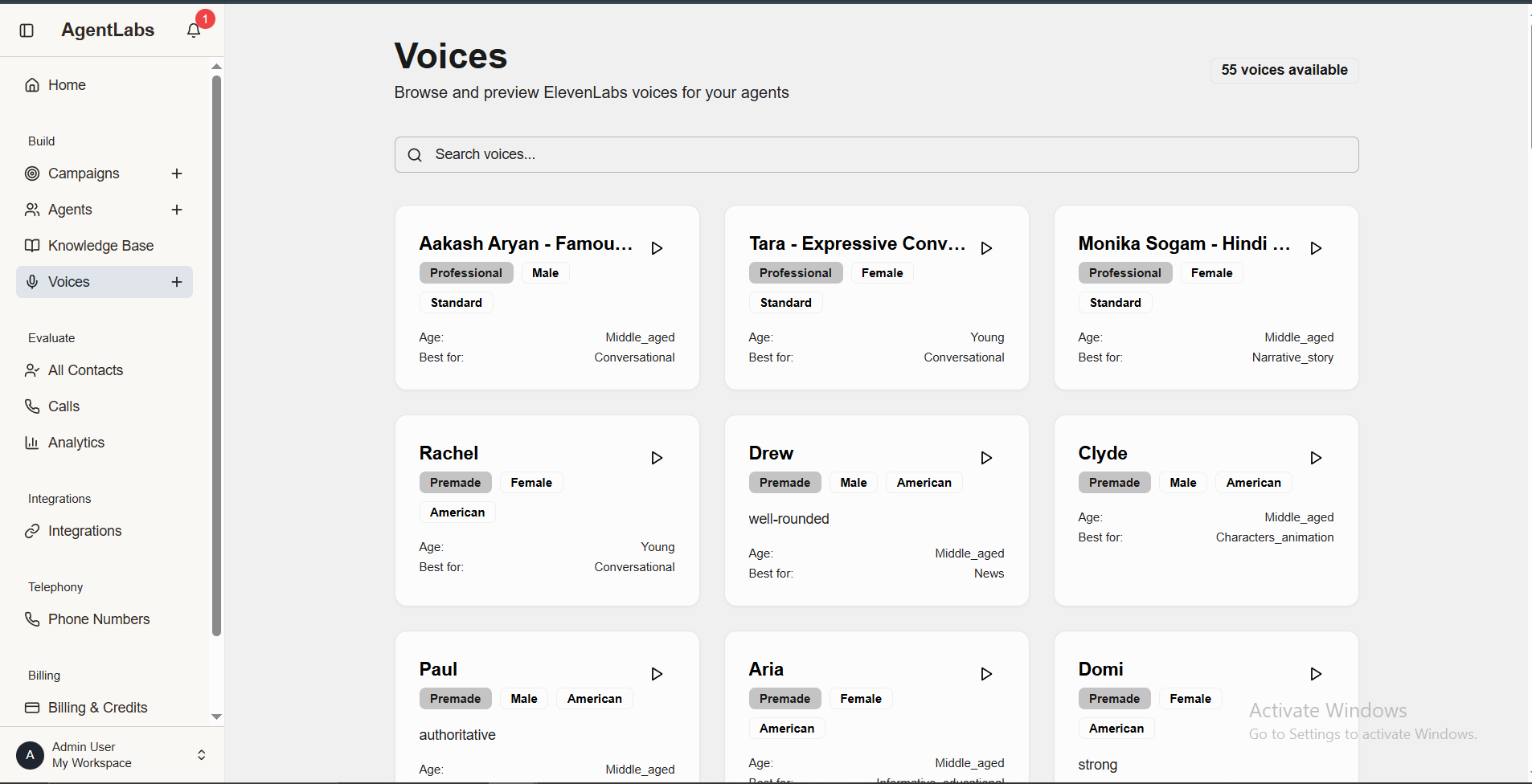
📋 Voices Overview
Voice Features
- • Voice Count: 55 voices available
- • Search: Search voices by name or characteristics
- • Play Button: Preview voice before selection (▶ icon)
- • Voice Cards: Grid layout showing all available voices
Voice Attributes
- • Voice Name: e.g., "Aakash Aryan - Famous"
- • Tone: Professional, Premade labels
- • Gender: Male, Female tags
- • Age Group: Young, Middle_aged
- • Best For: Use case (Conversational, Narrative_story, etc.)
Available Voices Examples
Aakash Aryan
Professional | Male | Middle aged | Conversational
Tara
Professional | Female | Young | Conversational
Rachel
Premade | Female | Young | Conversational
Drew
Premade | Male | Middle aged | News
Paul
Premade | Male | Middle aged | Authoritative
Monika Sogam
Professional | Female | Middle aged | Narrative
Analytics Dashboard
Comprehensive insights and performance metrics
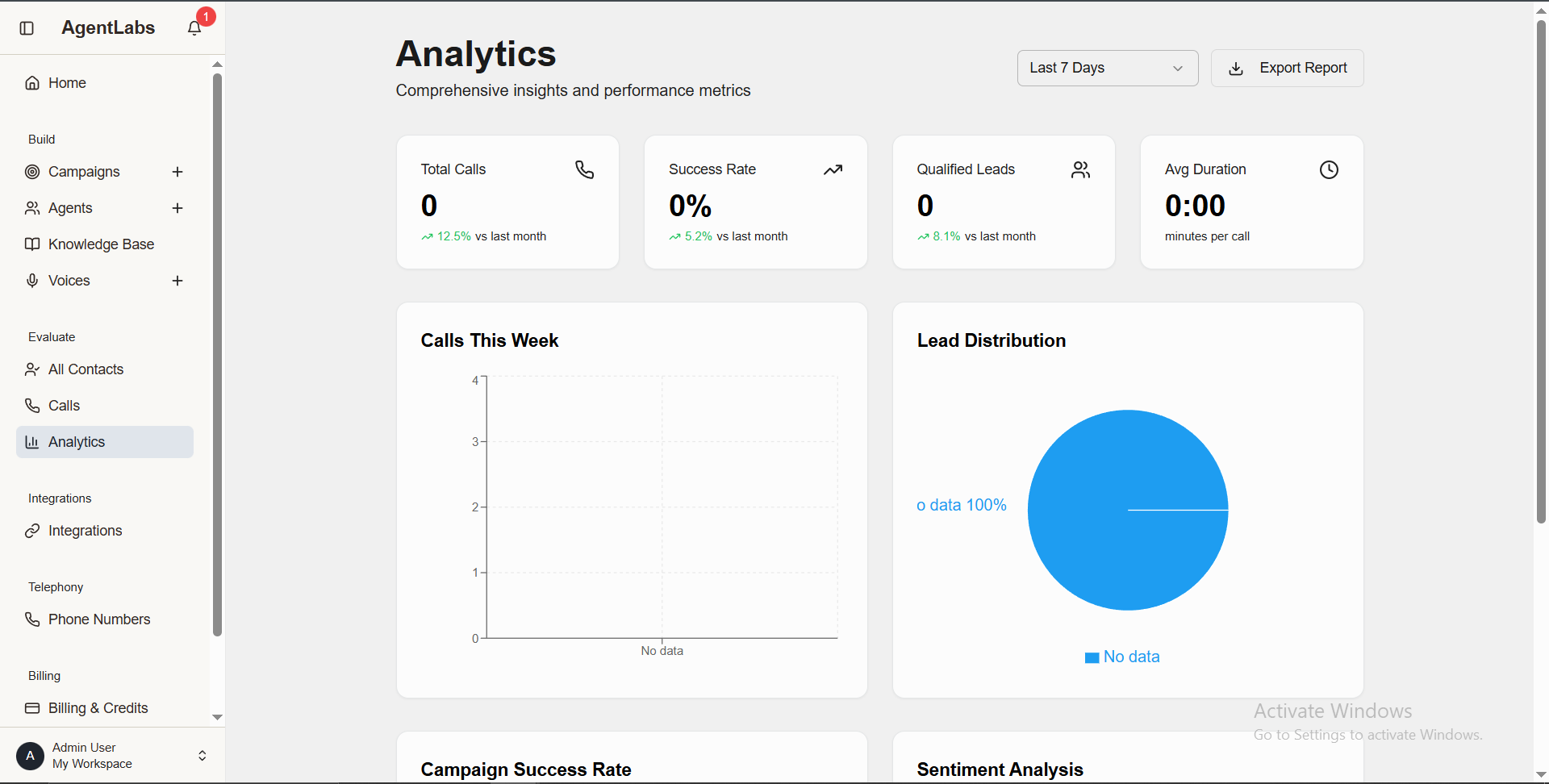
📋 Analytics Overview
Key Metrics
- • Total Calls: 0 calls (12.5% vs last month trend)
- • Success Rate: 0% (5.2% improvement vs last month)
- • Qualified Leads: 0 leads (8.1% increase vs last month)
- • Avg Duration: 0:00 minutes per call
Filter & Export Options
- • Time Filter: Last 7 Days dropdown selector
- • Export Report: Download analytics data as PDF/CSV
- • Date Range: Switch between Last 7 Days, 30 Days, Custom
Dashboard Charts
Calls This Week
Bar chart showing call volume by day. Currently shows "No data" state.
Lead Distribution
Pie chart showing lead quality breakdown (Hot/Warm/Cold). Shows "0 data 100%" currently.
Campaign Success Rate
Detailed breakdown of call completion rates across campaigns
Sentiment Analysis
Customer sentiment tracking during conversations (Positive/Negative/Neutral)
Insights Provided
- ✓ Real-time campaign performance tracking
- ✓ Month-over-month comparison trends
- ✓ Lead quality assessment
- ✓ Customer sentiment analysis
- ✓ Success rate metrics and improvements
- ✓ Call duration patterns
Integrations & Webhooks
Configure webhooks to send call data to external systems like CRMs
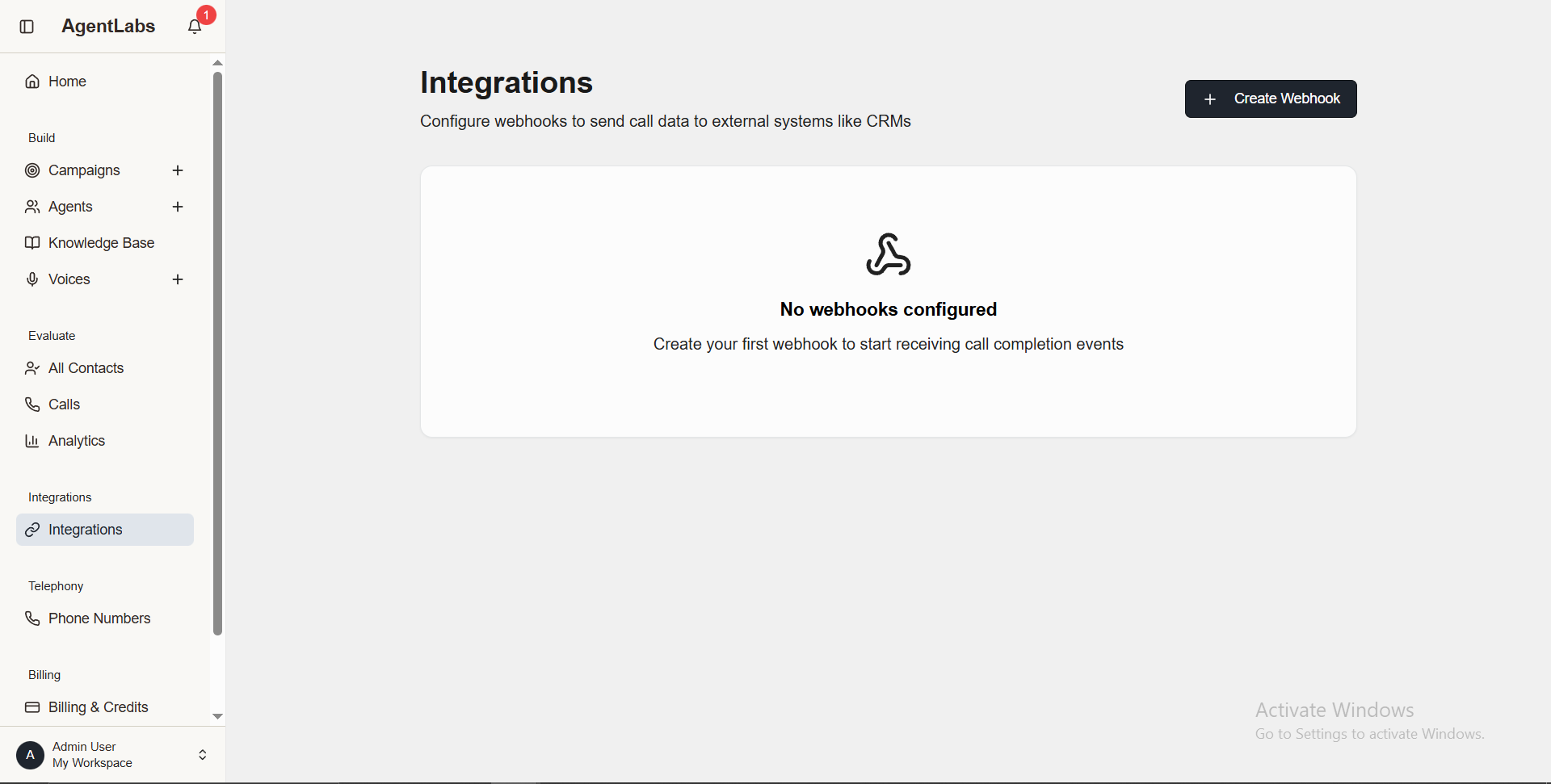
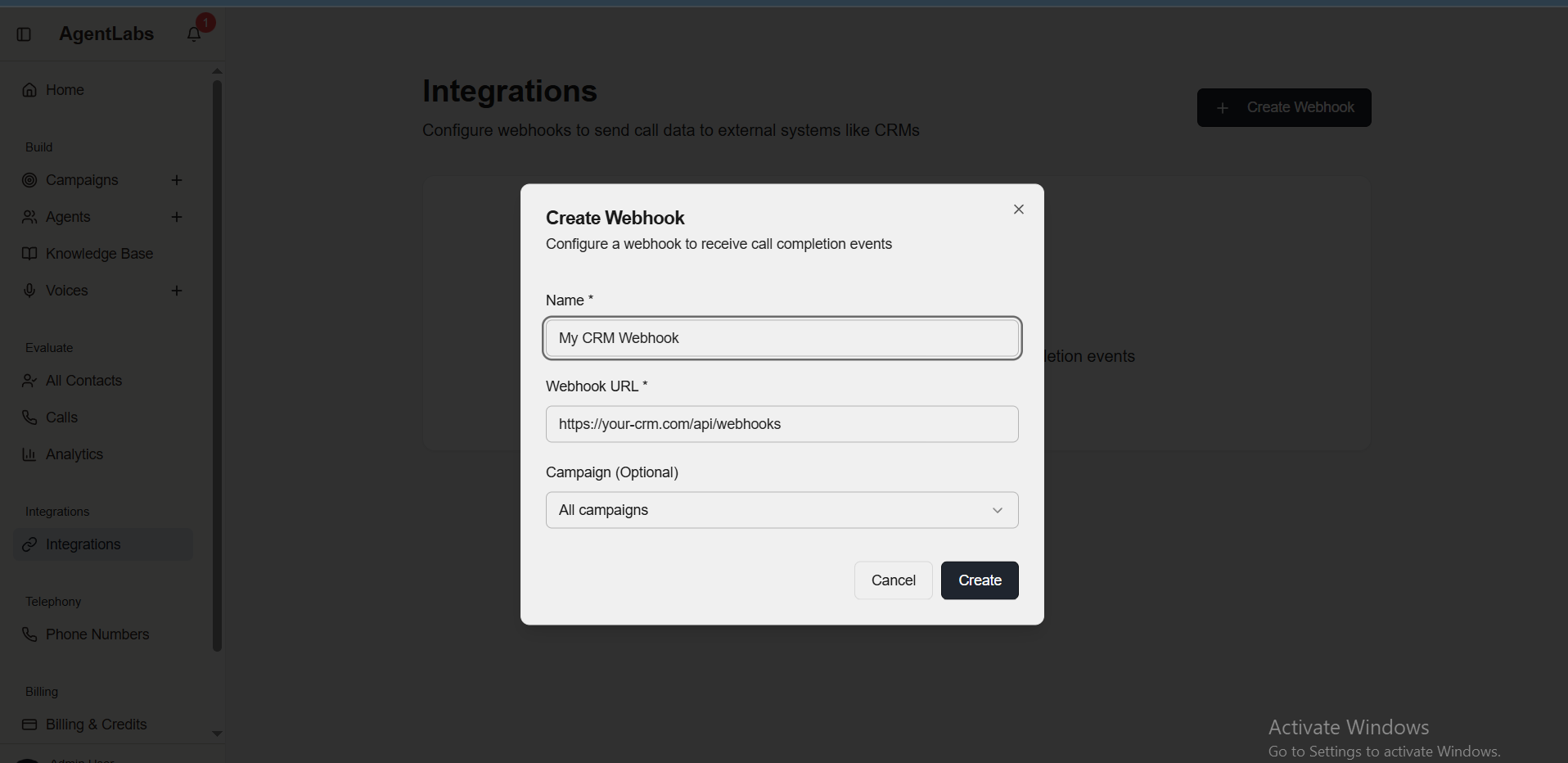
📋 Integrations Overview
Integrations List Features
- • Create Webhook Button: Top right to add new webhook integration
- • Empty State: "No webhooks configured" message
- • Purpose: Send call completion events to external systems
- • List Display: Shows all configured webhooks with details
Create Webhook Modal
- • Webhook Name: Identify webhook (e.g., "My CRM Webhook")
- • Webhook URL: Target endpoint (https://your-crm.com/api/webhooks)
- • Campaign Filter: Select which campaigns trigger webhook (All campaigns)
- • Create Button: Save webhook configuration
Webhook Events
- ✓ Call completion events
- ✓ Lead qualification updates
- ✓ Campaign status changes
- ✓ Agent performance metrics
- ✓ Real-time call data synchronization
- ✓ CRM integration support (Salesforce, HubSpot, Pipedrive, etc.)
Phone Numbers Management
Manage your Twilio phone numbers for calling campaigns
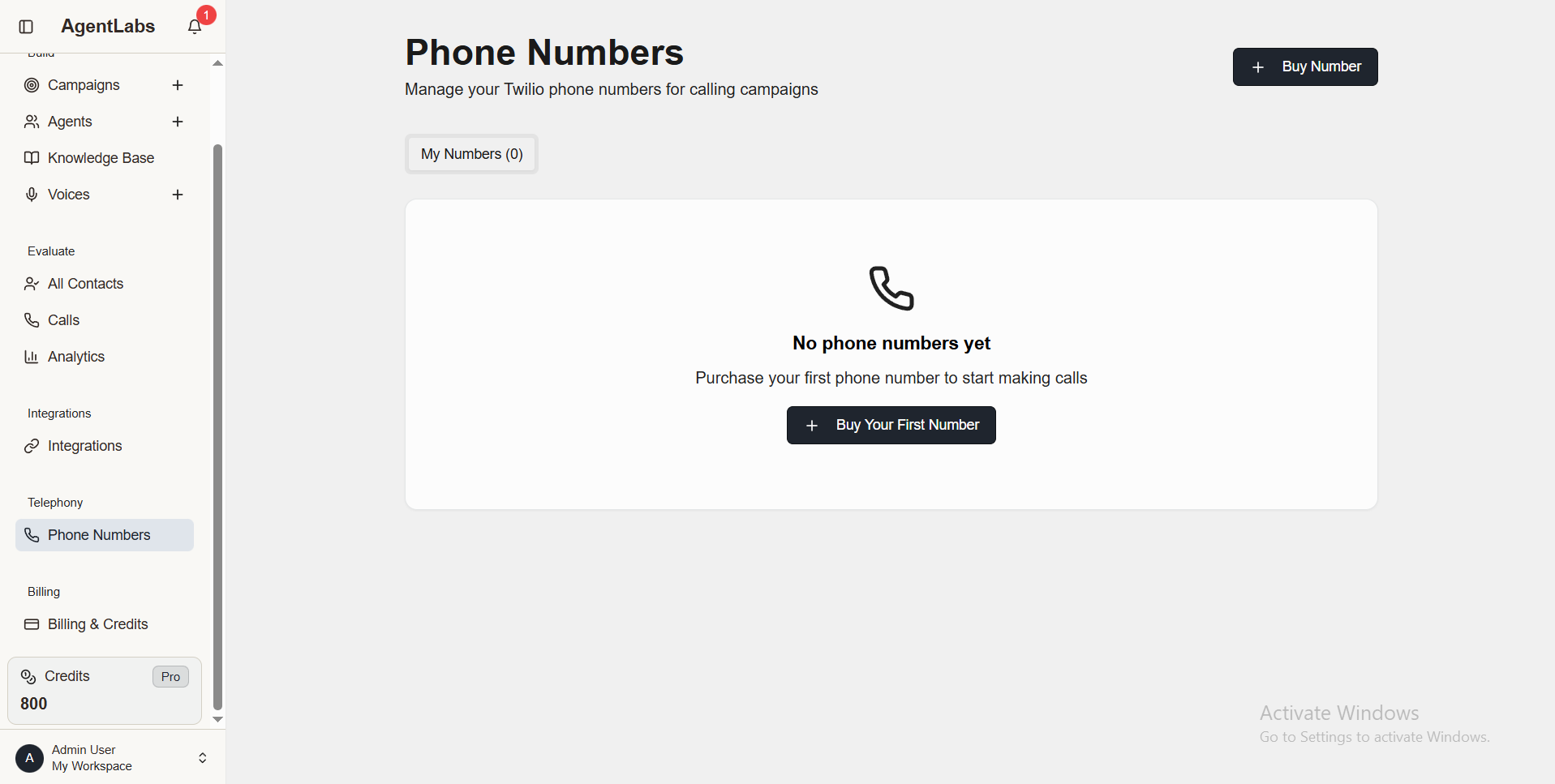
📋 Phone Numbers Overview
Phone Numbers List Features
- • My Numbers Tab: Shows "My Numbers (0)" - no purchased numbers
- • Buy Number Button: Top right to purchase new Twilio number
- • Empty State: "No phone numbers yet" with phone icon
- • Call to Action: "Purchase your first phone number to start making calls"
Buy Number Process
- • Search Numbers: Search by area code or country
- • Number Types: Local, toll-free, international options
- • Pricing: One-time purchase + monthly subscription cost
- • Assign Campaign: Link number to specific campaigns
After Purchasing Numbers
- ✓ View all purchased phone numbers in table format
- ✓ See number type (Local/Toll-free), status, and monthly cost
- ✓ Assign numbers to campaigns for caller ID
- ✓ Release unused numbers to save credits
- ✓ Monitor usage and call activity per number
- ✓ Credit balance shown in sidebar (800 credits available)
Billing & Subscription
Manage your subscription, credits, and billing


📋 Billing & Subscription Overview
Upgrade Your Plan Section
- • Free Plan (Current): 1 AI Agent, 1 Campaign, 5 Contacts, Credits as needed
- • Pro Plan (Recommended): $49/month or $490/year (save 17%)
- • Pro Features: Unlimited Agents, Campaigns, Contacts
- • Pro Benefits: 100 credits monthly + Priority support
- • Subscribe Buttons: Monthly or Yearly subscription options
Credits & Usage Section
- • Current Balance: 0 available credits display
- • Purchase Credits: Button to buy additional credits
- • Test Plan: $10 for 100 credits ($0.1000 per minute)
- • New Pack (Popular): $100 for 1,000 credits ($0.1000 per minute)
- • Transaction History: "No transactions yet" empty state
- • Notice: Active membership required to purchase credits
Plan Comparison
Free Plan
- ✓ 1 AI Agent
- ✓ 1 Active Campaign
- ✓ 5 Contacts per Campaign
- ✓ Purchase credits as needed
- ✗ No monthly credits included
Pro Plan ($49/mo)
- ✓ Unlimited AI Agents
- ✓ Unlimited Campaigns
- ✓ Unlimited Contacts
- ✓ 100 credits included monthly
- ✓ Priority support
Credit Packages Available
Test Plan - $10
100 credits • $0.1000/minute
New Pack - $100 (Popular)
1,000 credits • $0.1000/minute
📞 Support & Contact
📧 Getting Help
Ticket Support
Raise a ticketEmail Support
nb@diploy.in